• Skip to primary navigation
  • Skip to main content

White River Radio & Communications

A Place To Play Radio & Have A Good Time

  • Ops & Events
  • LogBook
  • Calendar
  • Nets
    • Net Control Schedule
    • All Net Info
    • NEA Linked Repeater System
    • Net Reports
  • Contact Us
  • About WRRC
  • Show Search
Hide Search

AG5CC

Hawaii POTA Hunt: Your Guaranteed Path to Victory and Success

AG5CC · August 10, 2025 · 2 Comments

Randy Wade (AF5RW) posted in our White River Radio & Communications Facebook group that he has all the states for POTA except Hawaii and was asking for tips on catching a Hawaii activation on SSB or CW.

I was in the same boat not too long ago, and here’s exactly what I did to finally snag Hawaii. I’m posting it here for Randy and anyone else who’s still hunting KH6 for their log.

Randy got the state he needed, you can too!

Step 1 – Get a List of All Hawaii POTA Parks

We want HamAlert to notify us only when a Hawaii POTA park comes on the air. To do that, we need the list of Hawaii park reference numbers.

  1. Go to: https://pota.app/all_parks.csv (You may need to be logged in or have JavaScript enabled to pull this.)
  2. Open the file in a spreadsheet editor like Excel or Google Sheets.
  3. Filter the “Country-State” column for US-HI (Hawaii).
  4. Copy the list of Park Reference numbers (e.g., US-0037, US-1234…). (Right now there are 103 parks in Hawaii.)

Step 2 – Create a HamAlert Account

If you don’t already have one:

  • Go to https://hamalert.org
  • Sign up for a free account.

Step 3 – Install the HamAlert App and Log In

HamAlert is what delivers the alerts to your phone when a Hawaii POTA park is spotted.

Download the app:

  • iPhone/iPad: Search “HamAlert” in the App Store (by Manuel Kasper).
  • Android: Search “HamAlert” in Google Play.

Log in:

  • Use the same username/password you created at hamalert.org.
  • Allow Notifications when prompted — that’s what enables instant push alerts.

Step 4 – Create a Hawaii POTA Trigger

(Tip: I find it much easier to set up everything using the HamAlert website on a computer or tablet instead of doing it all on the phone. Once the triggers are created online, you can just enable push notifications in the mobile app.)

  • Log in to hamalert.org.
  • Go to Triggers and click the + to add a new one.
  • In Conditions:
    • Mode: Select SSB and CW.
    • Park reference list: Paste in your Hawaii park reference numbers.
  • Under Actions:
    • Check App (this sends a push notification to your phone).
  • Name it something like Hawaii POTA Hunt and save.
US-HI_POTA-PARKSDownload

Step 5 – About Email Alerts

HamAlert used to offer direct email delivery, but that feature has been removed.

If you want email alerts instead of (or in addition to) push notifications, you can:

  • Use the URL notification option in HamAlert to send data to a service like IFTTT, Pushover, or Zapier, and have that service email you.
  • Or, just rely on the HamAlert app’s push notifications — they’re fast and don’t get caught in spam filters.

Step 6 – Sit Back and Wait

Now, anytime a Hawaii POTA activation is spotted on SSB or CW, HamAlert will ping your phone.

When that alert comes in — drop everything and call them before the pileup gets too big.


Got a trick for catching rare POTA parks? Share it in the comments — your tip might be the one that helps someone land their next big contact!

Play Radio & Have A Good Time!

AG5CC

  • Share on Facebook Share on Facebook

Pass The Ham Radio Exam at Home: Get Licensed Now!

AG5CC · September 9, 2024 · 1 Comment

Why Remote Amateur Radio Testing is a Game-Changer: My First Experience as a GLAARG VE

If you had told me 4 years ago that I’d be sitting at my desk proctoring a nationwide amateur radio exam through my computer, I might have laughed. But here we are—and after my first experience as a GLAARG (Greater Los Angeles Amateur Radio Group) Volunteer Examiner (VE), I’m convinced: remote testing is the way. It’s easier, more accessible, and, frankly, more fun than I ever expected.

Let me walk you through why I believe all amateur radio testing should be done this way.

A New Way to Give Back

Being a VE has always been about giving back to the community—helping new hams find their place in the world of amateur radio. But the remote format takes that to a new level.

In just one session, I was able to help candidates from all across the country, all from the comfort of my home in Arkansas. Imagine assisting aspiring hams from different states without anyone needing to drive, fly, or even leave their living room! It wasn’t just my small footprint in Arkansas—I was making an helping out nationwide, and that was both fulfilling and exciting.

The Smoothest Test Day Ever

We’ve all been through stressful test days—whether it’s the nervous energy in the room, waiting for your turn, or wondering if you brought the right pencils. Remote testing takes all that away.

As a first-time remote VE, I was a little nervous about how it would all go. But GLAARG has the process down to a science. The entire session flowed effortlessly, from checking IDs to monitoring the exam. Candidates were comfortable, I was comfortable, and the system is set up to run like a well-oiled machine. No one was left guessing what to do next, and it made for one of the smoothest exam days I’ve ever experienced—on either side of the desk.

Flexibility Like Never Before

One of the greatest things about remote testing is the flexibility it offers—for both candidates and examiners. When was the last time you heard someone say they took an amateur radio exam on a Wednesday evening after work, without leaving home? That’s the beauty of remote testing.

With GLAARG’s remote system, candidates can schedule their exams at times that fit their busy lives, and VEs like me can volunteer without rearranging our entire schedules. It’s a win-win. Living in a rural area, the flexibility meant I didn’t have to worry about finding a local session or driving hours to a test site.

Maintaining Integrity, Building Comfort

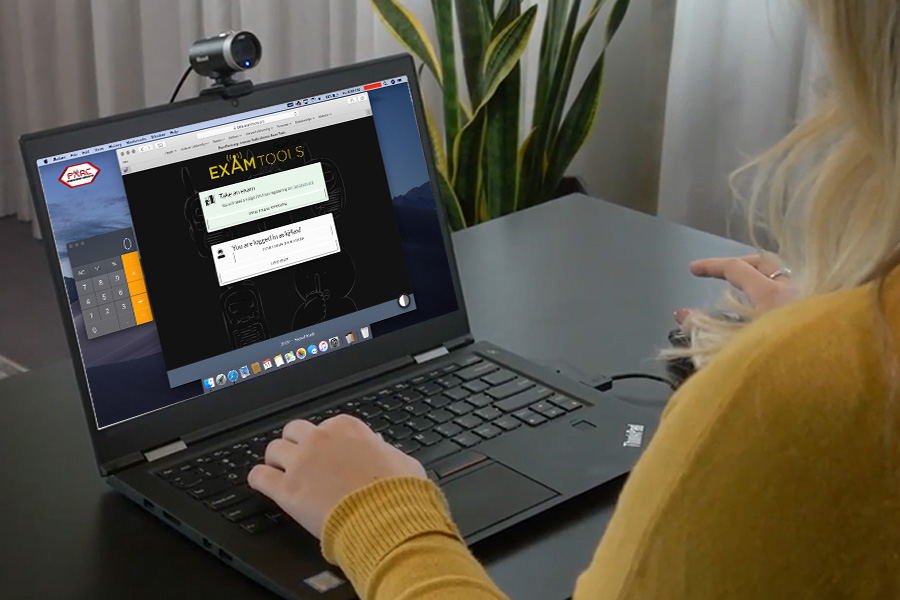
I’ll admit, I was a bit skeptical at first—how do you ensure the integrity of a remote test? But GLAARG’s procedures left no room for doubt. The exam was proctored just as rigorously as any in-person test if not more. From the thorough ID checks to the live webcam monitoring, the security was top-notch.

But here’s the thing: the candidates were more relaxed. There’s something about taking a test in your own space that reduces stress, and I could see the difference in their performance. The entire process was less intimidating, which ultimately helped candidates do their best.

Why Remote Testing is the Future

When I look at how smooth, secure, and flexible remote testing is, it’s hard to imagine going back to the old in-person model. Here’s why I think all testing should move in this direction:

  • Accessibility for All: No matter where you live, remote testing ensures you can get licensed without the hassle of travel.
  • More Opportunities to Volunteer: Remote proctoring opens the door for more VEs to participate from anywhere, which means more testing opportunities for candidates.
  • Lower Stress for Candidates: Testing at home removes a lot of the nerves and distractions that come with in-person exams.
  • Technologically Advanced: Remote testing shows that amateur radio isn’t stuck in the past—it’s adapting and thriving in a digital world.

Ready to Dive In?

If you haven’t tried remote testing yet, whether as a candidate or a VE, I encourage you to jump in. The experience is rewarding, and I genuinely believe it’s the way forward for our community. Remote testing is a more modern, accessible, and enjoyable way to ensure the future of amateur radio.

READY TO TEST NOW? SCHEDULE your remote testing session Here!
REady to be a remote VE (Volunteer examiner)? go here!

GLAARG is certainly not the only VEC that offers remote testing; I’m also an ARRL VE. About a year ago, I emailed GLAARG expressing interest, and they reached out to me again roughly three weeks ago to see if I was still interested. That’s how I ended up experiencing my first remote session as a GLAARG VE.

In addition to GLAARG, here are several other VECs that offer remote amateur radio testing:

  • W5YI-VEC – Known for its broad network of examiners, W5YI offers remote testing for all license classes.
  • Anchorage ARC VEC – A pioneer in remote testing, they’ve been offering online exams well before the surge in remote sessions.
  • Laurel VEC – Some teams under Laurel VEC have embraced remote testing to increase accessibility for candidates.
  • ARRL VEC – The American Radio Relay League has adopted remote testing, with certain examiners offering online sessions.
  • Greater Cincinnati Amateur Radio Association (GCARA) VEC – Another group providing remote testing opportunities for aspiring hams.

Each of these VECs, and I believe there are still others, contributes to making amateur radio licensing more accessible through remote testing, just like GLAARG.

Serving as a VE for GLAARG was a rewarding experience, and I’m looking forward to doing it again. After all, with how easy and efficient it is, why wouldn’t I?

Are you a fan of remote online testing? Let me know your thoughts in the comments.

Unleash Your POTA Power With Powerful HAM2K Logger!

AG5CC · August 26, 2024 · Leave a Comment

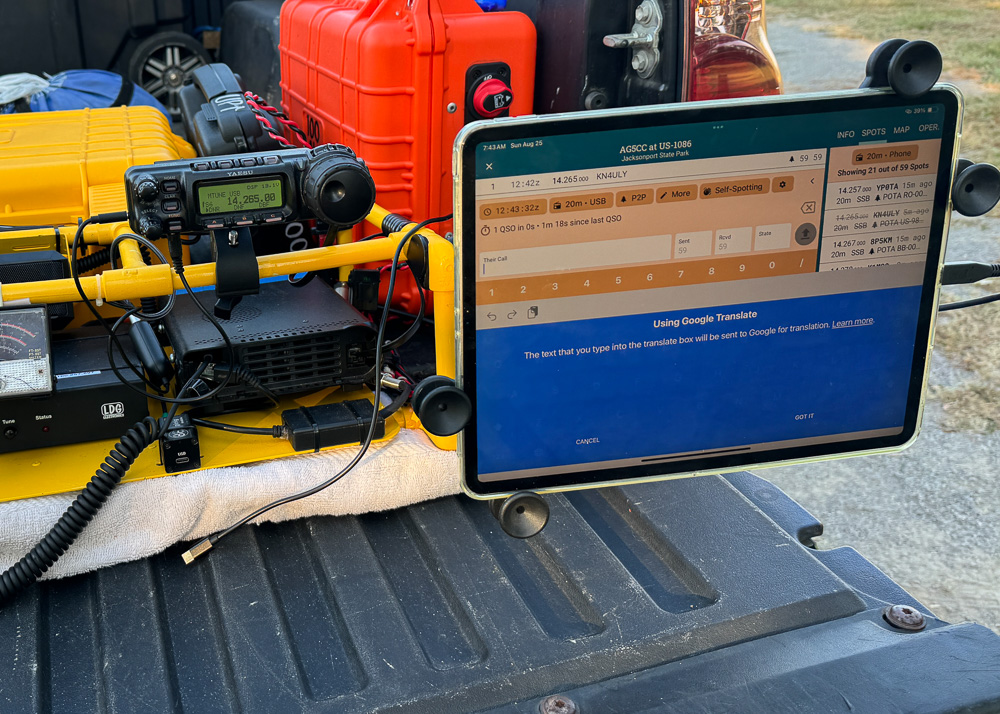
AG5CC POTA rig with an iPad running HAM2K Portable Logger (POLO)

Initial Impressions

On a crisp Sunday morning, Nathan, KI5EDP, and AG5CC (that’s me) set out with a clear mission: to activate Jacksonport State Park (US-1078) as part of the Parks on the Air (POTA) program. While the fresh air and the thrill of radio were draws in themselves, our primary objective was to put a new open-source logging software to the test: Ham2K Portable Logger, or PoLo as it’s affectionately known.

Introducing PoLo

PoLo is a powerful, free application available on both the Apple App Store and Google Play Store, making it easily accessible for iPads, iPhones, and Android devices. The developer, Sebastian KI2D, has plans for a Windows version, and Mac users with Apple silicon processors can already download the iPad version on their devices.

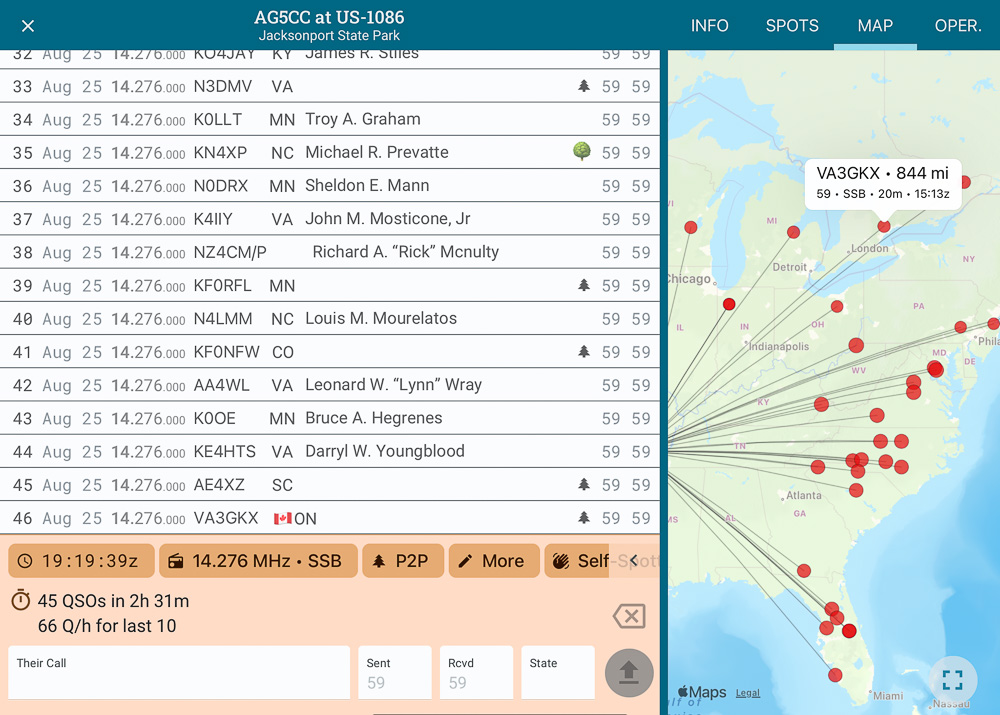
What sets PoLo apart is its focus on simplicity and efficiency. The app’s main screen is intuitively designed, placing all essential logging fields front and center, making it easy to log contacts, spot yourself, and grab spots—all from a single interface.

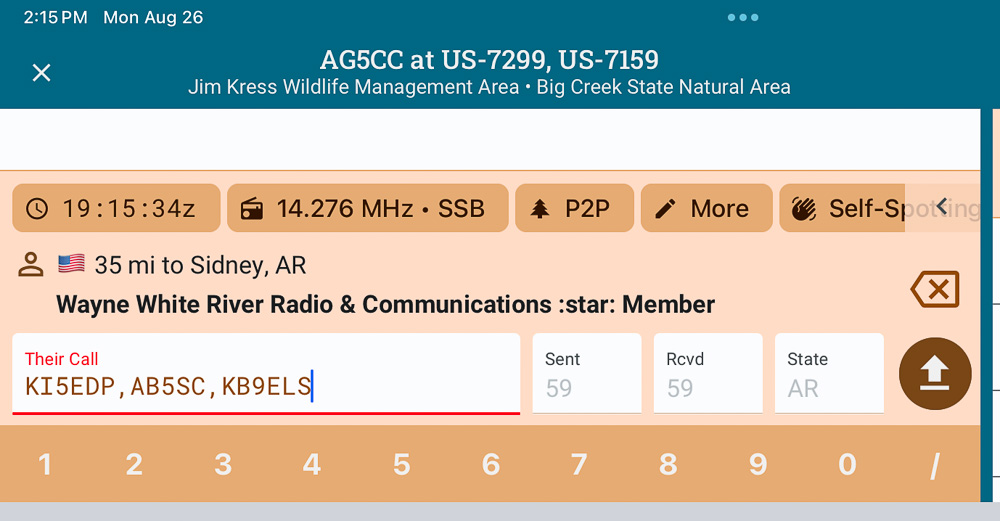
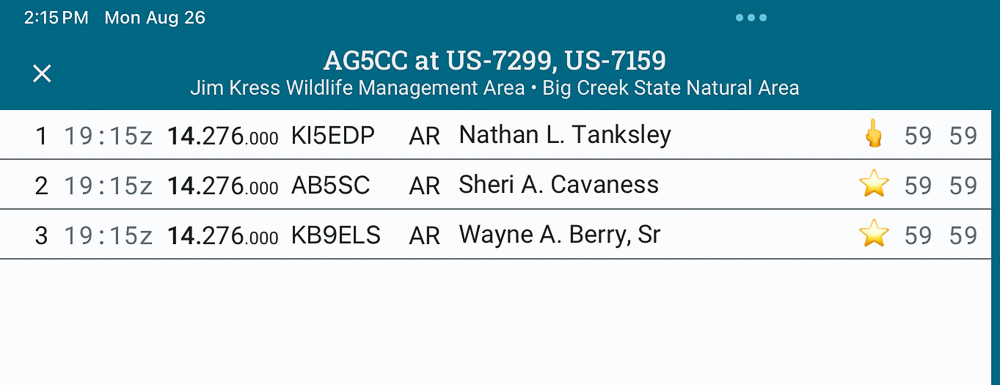
A particularly standout feature of PoLo is its handling of multiple operators or parks. Rather than inputting the same information multiple times, you can simply enter both callsigns or park numbers, separated by a comma. This is especially useful for N-Fers, saving time and reducing errors.

PoLo apps unique way of displaying a logged contact with multiple operators/parks.
PoLo app displaying a logged contact with multiple operators/parks.

User Experience

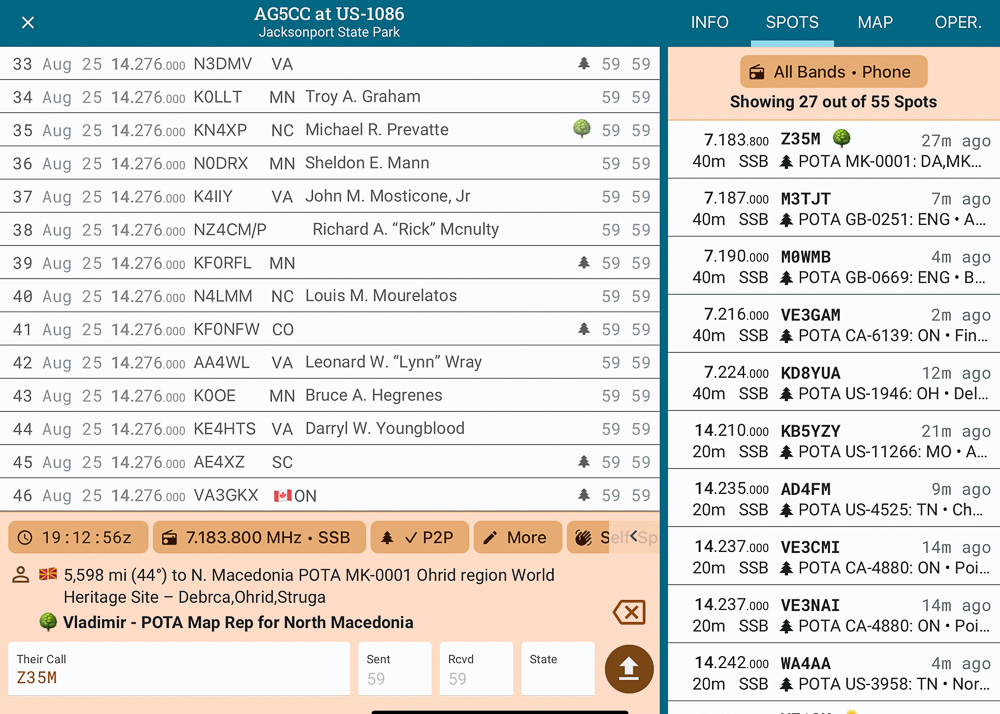
Customization is a key strength of PoLo. The app allows you to filter the spots window by band and mode, making it easier to find what you need. When you click on a spot, the app automatically fills in your logging window with the relevant details. After logging the contact, the spot is lined out, giving you a clear visual of what’s been completed.

Filtering spots by band and mode in the PoLo app.

For those who prefer a more visual approach, PoLo also includes a Map window, which can be expanded to full screen. This feature allows you to see your activations in a geographical context, enhancing the overall logging experience.

The Map view in PoLo, showing activated parks and contact locations.

Sebastian has integrated support for a wide range of activities, including POTA, Summits on the Air (SOTA), Field Day, Winter Field Day, and more. The application is completely free, with an option to support its development through a “Buy me a coffee” link.

Another impressive feature is the ability to export your activated park logs into a file that can be effortlessly imported into your Parks on the Air logbook, streamlining the process even further.

Final Thoughts

After just a few POTA activations using PoLo, it’s clear that this app is a strong contender in the realm of portable logging. While it may not replace my primary logger just yet, it has certainly earned its spot in my toolkit. Whether you’re looking for a lightweight option for a long hike or simply prefer to log on your phone or tablet, PoLo offers a reliable and efficient solution.

I highly recommend that all ham radio operators give PoLo a try. It’s an excellent app that’s still evolving, and I’m excited to see where it goes from here. You can stay up to date with the latest features and offer feedback directly to Sebastian through his Google Groups, Discord server, and website.

For those looking to log QSOs on the go with speed and ease, PoLo is definitely worth the download. I bet you’ll enjoy it as much as I do!

Visit the PoLo website and explore it for yourself!

73,
AG5CC

  • Share on Facebook Share on Facebook

Reusable, Power Pole Connector for Amateur Radio Operators

AG5CC · May 7, 2024 · Leave a Comment

Today, I’m sharing a simple, tool-free solution for creating a reusable Power Pole connector that’s perfect for portable operations like Parks on the Air (POTA) and Summits on the Air (SOTA). This quick-connect Power Pole connector can be connected to any stripped wire without the need for tools and is a must-have in every amateur radio operator’s field bag.

Watch the video and make it for yourself.

Why You Need This in Your Kit

When you’re out in the field, the last thing you want to worry about is fumbling with tools or losing small parts. This DIY Power Pole connector is designed to be assembled beforehand, allowing for quick and easy wire connections whenever needed. Its durability and reusability make it an excellent addition to your radio kit.

Materials Needed

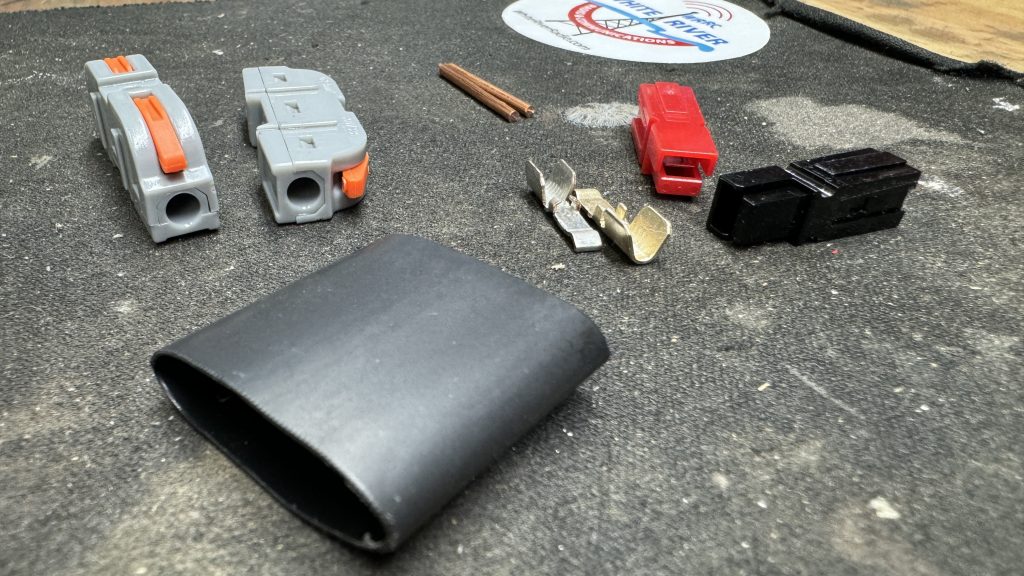
  • 1 Power Pole set (red and black housings)
  • 2 pieces of 1-1/16″ 12 gauge copper wire
  • 2 lever wire connectors for 12 gauge wire
  • 1″ of adhesive-lined heat shrink tubing
  • Solder

Tools Required

  • Soldering iron
  • Power Pole crimpers
  • Hot air gun

Steps to Build Your No-Tool Power Pole Connector

  1. Assemble the Power Pole Connector:
    • Begin by crimping the 12 gauge copper wires to the Power Pole terminals. Once crimped, solder the connections for extra durability to ensure a solid, lasting contact. This is particularly important as it strengthens the connector against the rigors of field use.
    • Carefully align and interlock the red and black housings of the Power Pole set. The correct orientation is crucial for ensuring proper electrical polarity when connecting to other devices.
  2. Interlock the Lever Wire Connectors:
    • Take the two lever wire connectors and interlock them securely. This setup will serve as the receiving end for the wire connections in the field, allowing for easy and reliable mechanical connections without additional tools.
  3. Connect Power Pole to Lever Wire Connectors:
    • Insert the bare ends of the assembled Power Pole connectors into one end of the interlocked lever connectors. Press down the levers to secure the wires in place. This method ensures a strong, tool-free connection that can be easily undone if necessary.
  4. Secure with Heat Shrink Tubing:
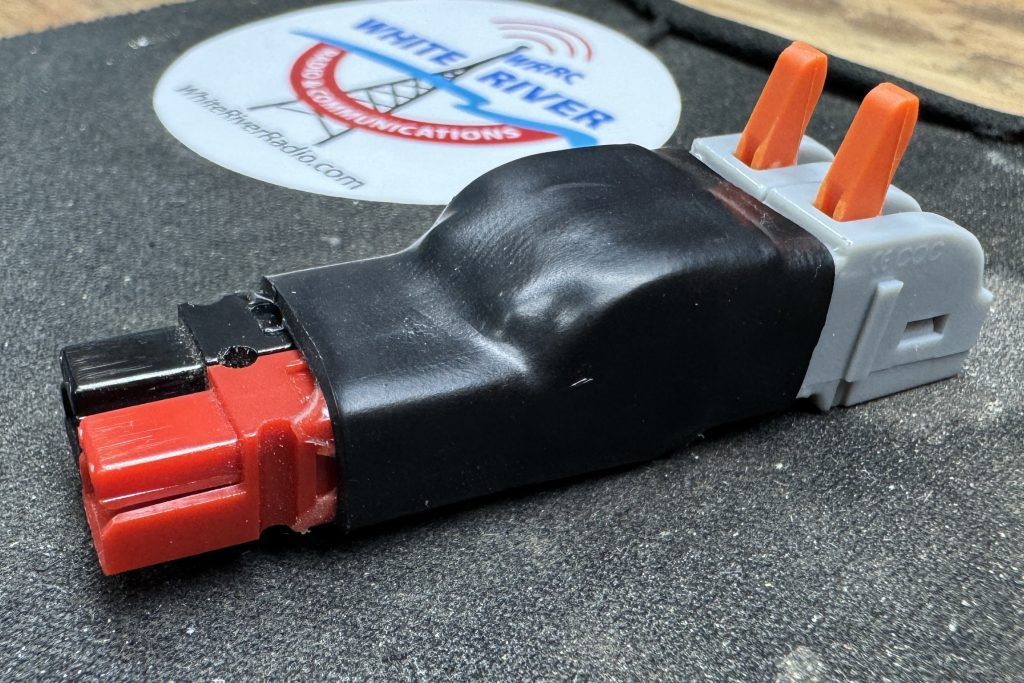
    • Slide the 1″ piece of adhesive-lined heat shrink tubing over the assembly where the Power Pole connectors meet the lever connectors. Use a hot air gun to shrink the tubing securely around the connectors. This not only holds down the levers but also integrates the entire assembly into a single, robust unit.

And there you have it! Your own versatile, reusable Power Pole connector that requires no tools to connect to a wire. This DIY project not only enhances your field radio operations by reducing setup time but also ensures you’re always ready to establish a reliable connection, no matter where your adventures take you.

Final Thoughts

This easy-to-build, robust connector is a great addition to any radio operator’s field equipment, providing reliability and ease of use when it’s most needed. Give it a try, and see how it simplifies your field setups!

Happy building and 73!

  • Share on Facebook Share on Facebook

Stephanie Wade’s Online Amateur Radio License Exam Journey

AG5CC · August 12, 2023 · Leave a Comment

Hey there, fellow Radio Rangers! I’ve got an exciting story to share with you all, about our very own Stephanie Wade’s recent adventure in obtaining her amateur radio license online. It’s a tale of quick thinking, support from our White River Radio & Communication Group, and the power of modern technology.

Stephanie and Randy Wade – Pioneers in online testing for White River Radio & Communications.

Now, if you’re part of our community, you might know that Stephanie already held a General license, but due to unforeseen circumstances, she had let it expire. To get her General license reinstated, she needed to retake the Tech exam. The initial plan was for Stephanie to take the exam in-person at the home of some of our VE’s (Volunteer Examiners) – specifically, at the home of George & Sheri (AG5CC and AB5SC) on a Friday evening.

But, as life often does, a family emergency cropped up, throwing a wrench into our plans. It was already Friday afternoon when we had to make the unfortunate decision to cancel the in-person exam. Not wanting to leave Stephanie hanging, I reached out to Randy (AB5EX), Stephanie’s husband, to break the news. However, I wasn’t going to leave them high and dry; I recalled that online exams were an option and decided to explore that avenue.

After mentioning the online option to Randy, he confessed that he wasn’t aware such a possibility existed. I assured him that it was indeed possible and that I knew of someone who had taken an online exam. I quickly got in touch with Nathan (KI5EDP), who provided me with the information I needed to guide Stephanie and Randy in the right direction.

Later that evening, around 7:30pm, I found myself still reflecting on the situation and feeling disappointed in myself for not informing Randy and Stephanie about the online testing option sooner. I decided to do some more research and I discovered just how accessible and convenient online testing had become. Eager to let them know, I shared another link with Randy, hopeful that it might still be of help.

Surprisingly, Randy let me know that Stephanie was scheduled to take the online test at 8:00pm that very night! I sent a quick message to Randy, encouraging him to tell Stephanie to “Break a leg” – a nod to their showbiz connection.

Around 8:45pm, Randy’s message popped up on my screen, letting me know Stephanie had passed the online exam! I eagerly inquired about the process, and Randy replied that it was surprisingly easy, especially for Stephanie, who was no stranger to online testing.

During my congrats on Stephanie’s accomplishment, I took a moment to apologize to Randy for not sharing this option sooner. We both agreed that our White River Radio & Communication Group should actively promote online testing availability more, as it offers greater flexibility and convenience for everyone involved.

As I put the finishing touches on this story, I’m reminded of the power of technology and community support. Stephanie’s journey from a canceled in-person exam to successfully passing an online test, within a matter of hours, showcases how adaptable and resilient we can be in the face of challenges.

Have you taken the amateur radio license exam online? Share your experiences and insights in the comments below. Remember, the world of radio communication is ever-changing, and it’s up to us to adapt and thrive. As always, Play Radio and Have a Good Time!

  • Share on Facebook Share on Facebook
  • Page 1
  • Page 2
  • Go to Next Page »

White River Radio & Communications

Copyright © 2026 • Site by AG5CC • Log in

  • Home
  • About WRRC
  • Subscribe
  • Contact Us